Before you record the exit
Last working day known?
Agree the exit date with the employee. Even if they are still due to take vacation — the exit date is the last actual working day.
All hours recorded?
Check under «Time entries» that all days up to the exit date are complete. Correct any forgotten clock-ins now.
Vacation and public holidays balanced?
Under Time tracking you can see the remaining vacation balance. A positive balance is paid out, a negative one is offset.
Open the final settlement
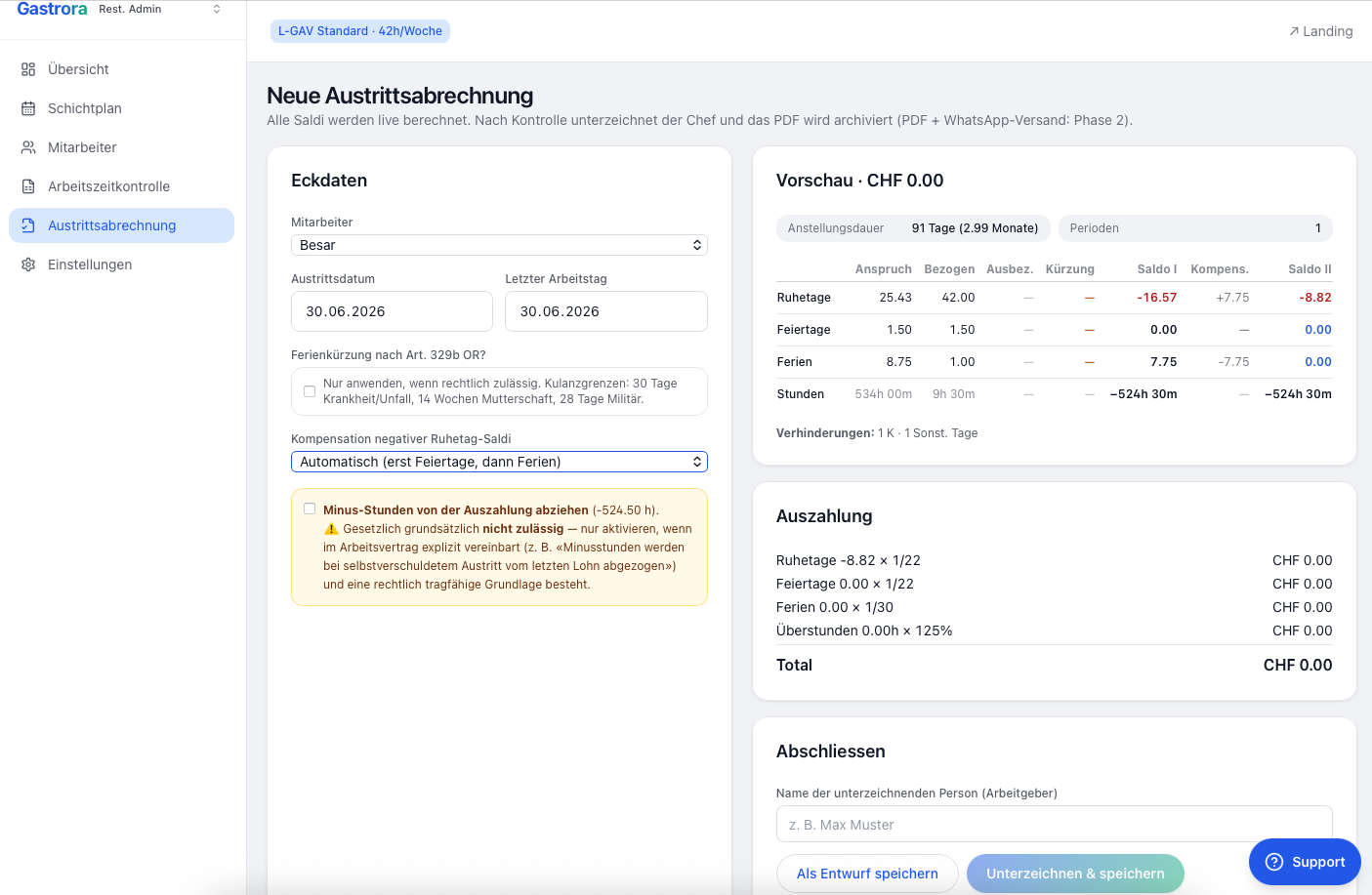
Click Final settlement in the sidebar on the left and then «New settlement». In the Key data block on the left, select the employee and enter the Exit date and Last working day.
Check the preview
To the right of the key data, at the top, you see the Length of employment in days and months and the number of employment periods. Below it is a balance table with the four rows Rest days, Public holidays, Vacation and Hours — each with Entitlement, Taken, Payout, Reduction, Balance I and Balance II.
Negative balances are shown in red, positive payout amounts in blue. That way you can see at a glance what you still owe whom and where amounts are offset.
Payout and signing
Below the preview you see the Payout block with all items and the total in CHF. Enter the name of the signing person and click «Sign & save» — done.
The settlement is archived as a PDF in GastroSuisse format. You can print it, hand it to the employee or send it by email.
Generate the PDF and send it to the employee
From the final settlement you create a PDF in GastroSuisse format. The document contains:
- Total working time since the start date (or onboarding cut-off date)
- Final flexitime balance (over-/undertime)
- Final vacation balance
- Final rest day balance
- Recommended payout (positive balances)
Via the «Send to employee» card → «Send WhatsApp», the employee receives their personal sign-off link via WhatsApp — just like for the monthly close. As soon as they have signed the final settlement, it is legally deemed accepted.
What to do if…
No problem — the settlement is calculated to the exact day up to the exit date. You don't have to wait for the next monthly close.
The negative vacation balance is offset in the final settlement — the days are deducted from the last salary. Gastrora shows you the exact figure.
On exit, overtime must be paid out (not converted into time off). The rate (100% or 125%) depends on whether you complied with the monthly communication.
After 14 days, the balance is automatically deemed accepted. Still: following up actively is usually wiser — your fiduciary wants clean documents.